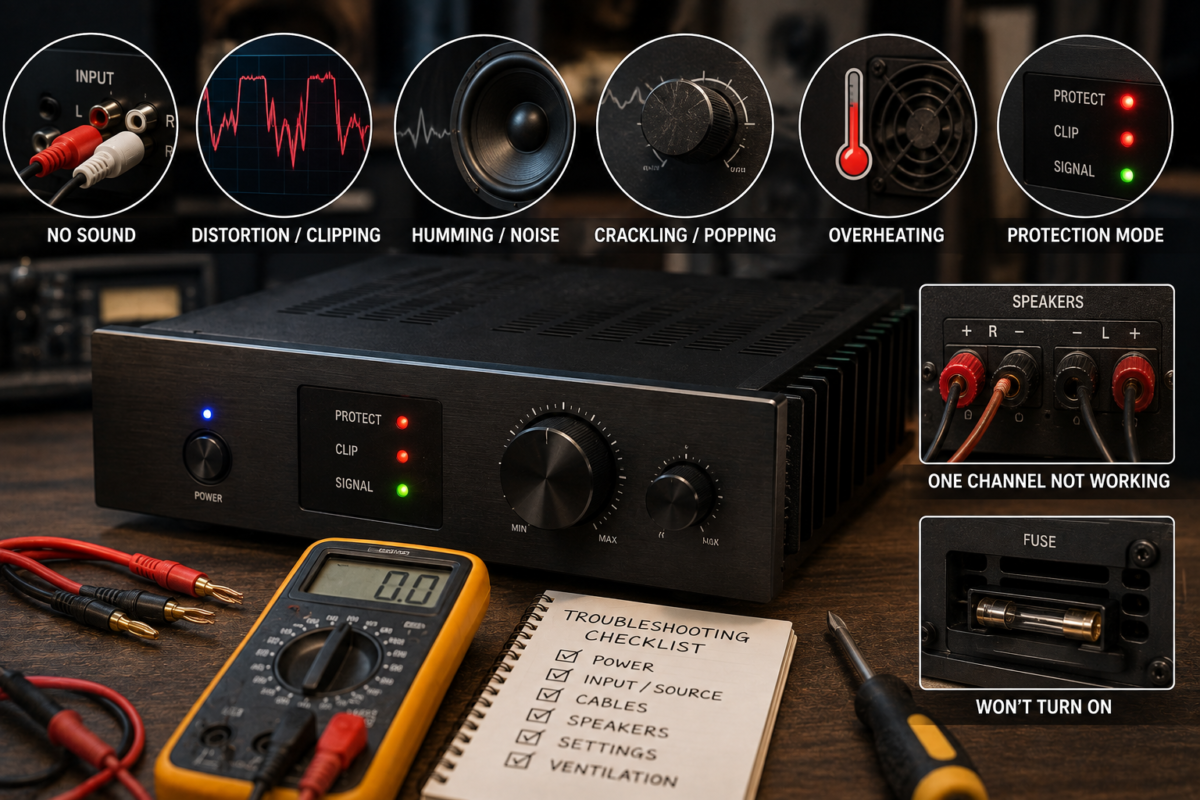
Amplifiers are designed to make audio louder, fuller, and more powerful. Whether you use one in a home stereo, car audio system, guitar setup, PA system, or home theater, problems can appear over time. Sometimes the issue is as simple as a loose cable or incorrect setting. In other cases, the amplifier may have overheating, power supply, speaker, or internal component problems.
The most common amplifier problems include no sound, distorted audio, humming, crackling, overheating, sudden shutdowns, protection mode, low volume, and one channel not working. The good news is that many issues can be identified with a few simple checks before professional repair is needed.
1. The Amplifier Has No Sound
One of the most frustrating amplifier problems is complete silence. The amplifier may turn on normally, but no audio comes from the speakers. This can happen because of a wrong input selection, disconnected cables, muted equipment, or a problem with the speaker wiring.
Start by checking the easiest possibilities:
- Make sure the amplifier is turned on.
- Confirm that the correct input source is selected.
- Check whether the source device, such as a phone, mixer, television, or music player, is producing sound.
- Turn up the amplifier’s volume gradually.
- Check whether the system has a mute function enabled.
- Inspect every audio cable and speaker wire.
- Make sure the speakers are connected to the correct output terminals.
A loose RCA cable, damaged auxiliary cable, disconnected optical cable, or faulty speaker wire can stop audio from reaching the amplifier or speakers. Try using a different input and cable to determine whether the problem follows the cable or stays with the amplifier.
If the amplifier has separate gain, master volume, and channel controls, check each one. A channel gain turned all the way down can make the amplifier appear to be defective even when it is working properly.
Some amplifiers also include a speaker selector, headphone mode, standby mode, or zone control. If the system is set to the wrong zone or remains in headphone mode, the main speakers may not produce sound.
If there is still no sound after checking the connections and settings, disconnect the amplifier from the speakers and inspect the fuse, power indicator, and protection light. A professional should examine the unit if it has power but produces no output from any input.
2. Distorted or Clipped Sound
Distortion occurs when the audio signal becomes harsh, fuzzy, compressed, or unpleasant. Music may sound acceptable at low volume but become rough when the volume is increased. In many cases, distortion is caused by pushing the amplifier beyond its limits.
Clipping happens when an amplifier tries to produce more power than it can safely deliver. Instead of reproducing the audio waveform smoothly, the amplifier cuts off the peaks of the signal. This creates a harsh sound and may damage speakers if it continues for a long time. Excessive input levels, poor gain settings, and impedance problems are common causes of clipping.
To reduce distortion, try these steps:
- Lower the amplifier’s gain.
- Reduce the volume on the source device.
- Avoid turning every volume control to maximum.
- Check whether the mixer, preamp, or audio interface is clipping.
- Use a speaker load that matches the amplifier’s recommended impedance.
- Test the system with another audio source.
Gain and volume are not always the same thing. Gain controls how strongly the input signal enters the amplifier, while the volume or master control adjusts the final output level. If the input gain is set too high, distortion can occur even when the master volume is not very loud.
A damaged speaker can also create distortion. Listen carefully to determine whether only one speaker sounds bad. If the distortion follows the speaker when it is connected to another channel, the speaker may be damaged. If the distortion remains on the same amplifier channel, the amplifier or cable may be responsible.
3. Humming, Buzzing, or Electrical Noise
A low humming or buzzing sound is another common amplifier problem. The noise may be heard even when no music is playing. It can come from power cables, grounding issues, faulty audio cables, nearby electronics, or a ground loop.
A ground loop can occur when connected devices use different electrical paths to ground. This may create a steady hum through the speakers. Poorly shielded or damaged cables can also pick up electrical interference from power adapters, computer equipment, lighting systems, and other devices.
To locate the source of the noise:
- Turn the amplifier volume down and listen.
- Disconnect the input cables while leaving the speakers connected.
- Reconnect each device one at a time.
- Move audio cables away from power cables.
- Try another input cable.
- Test the amplifier with a different power outlet.
- Disconnect nearby electronic devices temporarily.
If the hum disappears when the input cables are removed, the problem may be connected to the source device or cable rather than the amplifier itself. If the hum remains with nothing connected to the inputs, the amplifier may have an internal power supply or grounding fault.
Avoid randomly removing the ground connection or using unsafe electrical adapters. Grounding is an important safety feature. If the hum is strong, the amplifier becomes hot, or you notice sparks or a burning smell, turn it off and seek professional assistance.
4. Crackling, Popping, or Intermittent Sound
Crackling and popping noises may occur when turning a knob, changing the volume, moving a cable, or playing music. Intermittent sound can be especially difficult to diagnose because the amplifier may work normally for several minutes before the problem returns.
A noisy volume or tone control may have dust, oxidation, or wear inside it. If the crackling happens only when a knob is turned, the control may need cleaning or replacement. Do not spray ordinary household cleaners inside the amplifier. Use products intended for electronic controls, and follow the manufacturer’s instructions.
Loose connections are another common cause. Inspect the following:
- Speaker terminals.
- RCA, XLR, or instrument cables.
- Input and output jacks.
- Power connections.
- Fuse holders.
- Internal connectors, if a qualified technician is inspecting the unit.
If moving a cable causes the sound to cut in and out, replace the cable first. Cable replacement is usually safer and less expensive than opening the amplifier.
Crackling that occurs continuously, even when no controls are being moved, may indicate a failing component. Aging capacitors, damaged transistors, loose solder joints, and failing output devices can all cause unstable audio. Internal repairs should be handled by a trained technician because amplifiers can contain dangerous voltages even after they have been switched off.
5. The Amplifier Overheats
Amplifiers naturally produce heat, especially when operating at high volume. However, excessive heat is a warning sign. An amplifier that becomes extremely hot, shuts down, smells like burning electronics, or repeatedly enters protection mode may have a cooling, load, or electrical problem.
Poor ventilation is one of the most common causes of overheating. An amplifier should not be placed in a sealed cabinet, directly against a wall, under heavy equipment, or near a heat source. Dust blocking the fan, vents, or heat sink can also restrict airflow. Proper ventilation helps the amplifier remove heat during operation.
Possible causes of overheating include:
- Blocked ventilation openings.
- A failed or dirty cooling fan.
- A speaker load below the amplifier’s safe impedance.
- Prolonged operation at maximum volume.
- Clipping caused by excessive gain.
- A damaged speaker or shorted speaker wire.
- High room temperature.
- An internal electronic fault.
Turn the amplifier off and allow it to cool before testing it again. Check that the vents are open and that the fan spins freely, if the unit has one. Clean dust from the outside using appropriate methods, but do not open the amplifier unless you know how to work safely with electronic equipment.
Do not continue using an amplifier that overheats repeatedly. Heat can damage internal components and connected speakers. If the amplifier becomes hot even at low volume with the correct speaker load, professional diagnosis is recommended.
6. The Amplifier Goes Into Protection Mode
Many modern amplifiers have a protection circuit. This circuit may turn off the output or illuminate a protection indicator when it detects overheating, a short circuit, excessive current, low voltage, or a serious internal fault.
Protection mode is not usually a random malfunction. It is the amplifier’s way of preventing additional damage. Common causes include incorrect speaker impedance, shorted speaker wires, faulty speakers, unstable power, overheating, and internal output-stage problems.
To troubleshoot protection mode safely:
- Turn the amplifier off.
- Allow it to cool for several minutes.
- Inspect the speaker wires for loose strands touching another terminal or metal surface.
- Check that the speakers match the amplifier’s minimum impedance rating.
- Disconnect the speaker wires and turn the amplifier on briefly.
- If the protection light disappears, inspect the speakers and wiring.
- Reconnect one speaker or channel at a time.
If the amplifier remains in protection mode with the speakers disconnected, the issue may be inside the amplifier. Do not repeatedly power-cycle it or replace the fuse with one that has a higher rating. The correct fuse protects the amplifier and wiring from excessive current.
In car audio systems, low battery voltage, weak grounding, undersized power cables, and poor connections can also trigger protection mode. Check that the amplifier receives stable power and has a solid ground connection. If you are not comfortable testing electrical voltage, have the system checked by a qualified installer.
7. Only One Channel Works
When sound comes from one speaker but not the other, the problem may be caused by a cable, source setting, speaker, or amplifier channel. It is best to test the system methodically instead of assuming that the amplifier is defective.
First, check the balance control on the source device and amplifier. The balance may be set completely to the left or right. Next, swap the left and right input cables. If the silent channel changes sides, the source or input cable may be faulty.
You can also swap the speaker connections, provided the amplifier and speakers are compatible. If the same speaker remains silent, inspect that speaker and its wire. If the problem stays with the same amplifier output, that channel may have an internal fault.
A failed fuse, damaged output transistor, bad relay, or loose solder connection can cause one channel to stop working. These issues usually require testing equipment and technical experience. Avoid connecting and disconnecting speaker wires while the amplifier is powered on.
8. Low Volume or Weak Output
An amplifier may turn on and produce sound, but the volume may be much lower than expected. This can result from incorrect gain settings, a weak source signal, poor cables, incorrect speaker connections, or a partial internal failure.
Check the entire signal chain from beginning to end. Confirm that the source device is not muted or set to a very low level. Inspect the amplifier’s input sensitivity, gain, master volume, and channel controls. If the amplifier is connected to a mixer or audio interface, check the output level on that device as well.
Speaker wiring can also affect output. A loose connection, reversed wiring, or incorrect bridge configuration may reduce performance. In car and PA systems, speakers connected with the wrong impedance can make the amplifier reduce output or shut down to protect itself.
Try another source and another speaker cable. If the output remains weak on every input and channel, the amplifier may have a power supply or output-stage problem. A technician can measure the unit and determine whether repair is practical.
9. The Amplifier Will Not Turn On
When an amplifier does not power up, begin with the power source rather than opening the unit.
Check the following:
- Confirm that the outlet or vehicle power source works.
- Inspect the power cord for damage.
- Make sure the power switch is fully engaged.
- Check the amplifier’s fuse.
- Look for a separate remote-turn-on or standby control.
- Confirm that the power adapter has the correct rating.
- Inspect car audio power and ground connections.
A blown fuse may be caused by a temporary power surge, but it can also indicate a deeper fault. Replace it only with the same type and rating specified by the manufacturer. If the replacement fuse blows immediately, stop testing the amplifier. Repeatedly installing new fuses can create a safety hazard and cause further damage.
For car amplifiers, the remote wire must receive the correct turn-on signal. A disconnected remote wire can make the amplifier appear completely dead even when the main power cable is connected.
If the amplifier has no lights, no fan activity, and no response after the basic checks, the power supply, switch, fuse circuit, or internal components may have failed.
10. The Amplifier Shuts Down During Use
An amplifier that cuts out during loud passages may be overheating, clipping, receiving unstable power, or detecting an unsafe speaker load. The timing of the shutdown provides a useful clue.
If the amplifier works again after cooling, overheating is likely. If it shuts down only at high volume or when bass increases, the amplifier may be overloaded or the speakers may have too low an impedance. If it cuts out when the vehicle starts, when a cable moves, or when the system vibrates, inspect the power and speaker connections.
Make sure the amplifier is not being driven beyond its rated output for long periods. Loudness is affected by the amplifier, speakers, room, source level, and system design. Turning up the gain cannot safely compensate for speakers or an amplifier that are too small for the application.
A sudden shutdown followed by a protection light should be treated as a warning. Lower the volume, turn the unit off, and inspect the wiring and ventilation before using it again.
11. Weak Bass or Poor Sound Quality
Sometimes an amplifier works but does not sound right. The audio may have weak bass, thin vocals, harsh treble, or an uneven balance. This does not always mean the amplifier is damaged.
Incorrect tone controls, equalizer settings, crossover controls, and speaker placement can change the sound significantly. In a car audio system, a subwoofer may sound weak because of incorrect phase, wiring polarity, crossover frequency, or enclosure problems. In a home stereo, speakers placed too close to a wall or corner may produce excessive bass rather than weak bass.
Check whether the speaker wires are connected with the correct polarity. If one speaker is wired backward, the speakers can partially cancel each other’s bass, especially when positioned close together. Keep the settings neutral while troubleshooting, then adjust one control at a time.
Test the amplifier with familiar music and a known-good speaker. This helps separate an equipment problem from a recording, streaming, or source-device issue.
How to Prevent Amplifier Problems
Regular care can reduce the risk of common amplifier failures. Keep the unit clean, dry, and properly ventilated. Use speakers with an impedance that falls within the amplifier’s specifications, and avoid operating at maximum volume for extended periods.
Before turning the system on, check that the cables are secure and that the controls are set to a reasonable level. Avoid connecting or disconnecting speakers while the amplifier is powered. Use suitable power cables, fuses, and adapters, especially in car and professional audio installations.
It is also useful to watch for early warning signs, such as unusual heat, intermittent crackling, a burning smell, repeated fuse failure, protection mode, or a new hum. Addressing these symptoms early can prevent a minor connection problem from becoming an expensive repair.
When to Call a Professional
Simple checks can solve many amplifier problems, but internal repairs require caution. Amplifiers can contain high-voltage components that remain dangerous after the power has been disconnected. Do not open the unit if you are unfamiliar with electronic repair or electrical safety.
Professional service is recommended when the amplifier repeatedly blows fuses, stays in protection mode, produces smoke or a burning smell, overheats at low volume, loses an entire channel, or has an internal fault. A qualified technician can test the power supply, output stage, protection circuit, speaker load, and signal path.
In most cases, the fastest troubleshooting method is to start with the basics: power, input selection, cables, speaker wiring, impedance, gain, and ventilation. These checks often reveal the cause without requiring complicated equipment.